Communication is the lifeblood of any growing business. Yet, so many offices are still dragging along old, clunky telephone systems that belong in the early 2000s. If your team is constantly dealing with missed calls, dropped lines, or astronomical monthly phone bills, you are likely feeling the pinch of an outdated infrastructure.
The shift toward hybrid work environments and digital-first client interactions has forced modern businesses to rethink their setups. Enter the IP PBX (Internet Protocol Private Branch Exchange) system. It leverages your existing internet network to manage calls, offering flexibility, scalability, and savings that traditional analog lines simply cannot touch.
But what actually goes into making one of these setups tick? If you are looking to deploy or optimize one, you need to understand the structural backbone. Let’s break down the Essential Components of a Modern IP PBX System so you can build an agile, future-proof communication network.
The Central Nervous System: Core Control Elements
At its heart, an IP PBX system replaces the massive hardware boxes of yesteryear with software-driven routing. It acts as the traffic controller for every bite of voice data entering or leaving your organization.
The IP PBX Server (The Engine Room)
The IP PBX server is the central brain where all call routing logic, user configurations, and system features live. Depending on your business strategy, this core engine can be deployed in two completely different environments:
-
On-Premise IP PBX: A physical server or appliance sits right inside your office IT closet. This gives your internal IT team total control over security protocols, configurations, and internal network speeds. Businesses that prioritize absolute data sovereignty over simple setups often land here.
-
Cloud-Based IP PBX: The entire core system is hosted remotely by a service provider. There is no physical hardware to buy or maintain on-site, making it incredibly easy to scale up or down instantly.
SIP Trunking (The Virtual Phone Lines)
In traditional setups, physical copper wires run from the telecom provider to your building. A modern IP PBX uses SIP Trunking (Session Initiation Protocol) instead. Think of SIP trunking as a collection of virtual phone lines running over your fiber internet connection.
It handles the signals required to connect, maintain, and terminate voice, video, and messaging sessions globally. Because these lines are digital, you can scale channels instantly without waiting for a technician to run physical wires to your office.
Endpoints and User Interfacing Hardware
How do your employees actually interact with the network? An IP PBX is highly versatile because it doesn’t lock you into using just one type of desk phone. It turns almost any internet-connected device into an extension.
IP Desktop Phones
While softphones are incredibly popular, physical desk phones remain a staple for receptionists, executive suites, and conference rooms. Unlike old analog phones, an IP phone functions like a mini-computer. It Plugs directly into an ethernet port, pulls its own IP address, and handles voice processing internally. High-end variants feature large touchscreen displays, integrated video conferencing, and customizable shortcut keys.
Softphones and Mobile Client Applications
One of the massive perks of modern telephony is its native support for remote and hybrid teams. A softphone is simply a software application installed on a desktop computer, laptop, or smartphone that acts exactly like a desk phone.
By utilizing secure applications on their mobile devices, employees can make and receive calls using their official office numbers from anywhere in the world. This keeps personal phone numbers private while ensuring client calls are cleanly logged into your corporate system.
Bridging the Legacy Gap: VoIP Gateways
Transitioning to a modern network doesn’t always happen overnight. You might have legacy hardware you aren’t ready to scrap, or local telecom limitations that require physical backup lines. This is where media gateways step in.
FXS Gateways (For Analog Extensions)
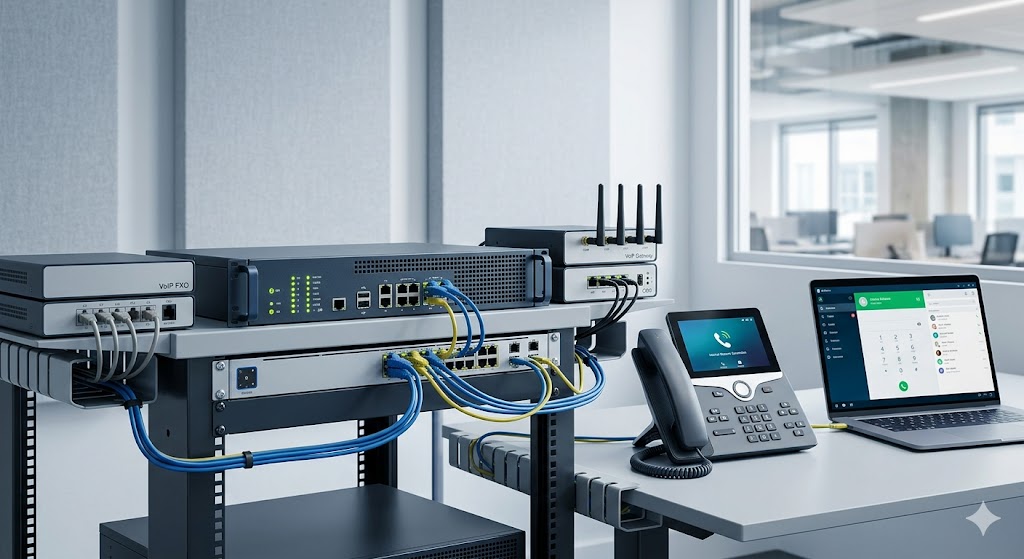
If your building already features a vast network of traditional analog phones or fax machines, you don’t necessarily have to throw them away. An FXS (Foreign Exchange Station) gateway allows you to connect these legacy analog devices directly to your modern IP PBX. It converts the analog electrical signals into IP packets, giving your old hardware a new lease on life.
FXO Gateways (For Analog Lines)
Conversely, you might want to keep a few traditional local analog phone lines running into your building as an emergency backup in case your primary internet drops out. An FXO (Foreign Exchange Office) gateway allows you to plug these legacy analog lines into your digital IP PBX system, routing external analog calls smoothly through your digital system.
GSM Gateways (For Mobile Network Routing)
For businesses looking to significantly lower their outbound calling costs, a GSM gateway is a game-changer. It holds cellular SIM cards and connects your IP PBX directly to cellular networks. Instead of paying landline-to-mobile rates for customer service outreach, the system routes the call over cellular bands, converting standard office calls into incredibly cheap mobile-to-mobile connections.
Crucial Networking Infrastructure
Your voice calls are now running as data packets across the exact same network your employees use to watch videos, download files, and send emails. To keep voice quality crystal clear, your underlying local area network (LAN) must be configured correctly.
Power over Ethernet (PoE) Switches
Running an individual power adapter to every single desktop IP phone creates a massive cable mess and leaves your phones vulnerable during a power outage. A PoE switch delivers both high-speed data and electrical power through a single standard ethernet cable. By connecting your PoE switches to a centralized Uninterruptible Power Supply (UPS) in your server room, your entire phone system stays up and running even if the building loses power.
Quality of Service (QoS) Enabled Routers
Nothing ruins a professional business call faster than jitter, echo, or sudden audio drops. Because voice data happens in real-time, it cannot tolerate the brief delays that standard web browsing can. A QoS-enabled router solves this by inspecting network traffic and giving voice data packets absolute priority over everything else. If an employee starts downloading a massive file, the router intentionally slows their download slightly to ensure your client calls remain crystal clear.
Essential Software Features and Integrations
A truly modern IP PBX system does far more than just route dials; it functions as an advanced productivity hub that simplifies your day-to-day operations.
Multi-Level Interactive Voice Response (IVR)
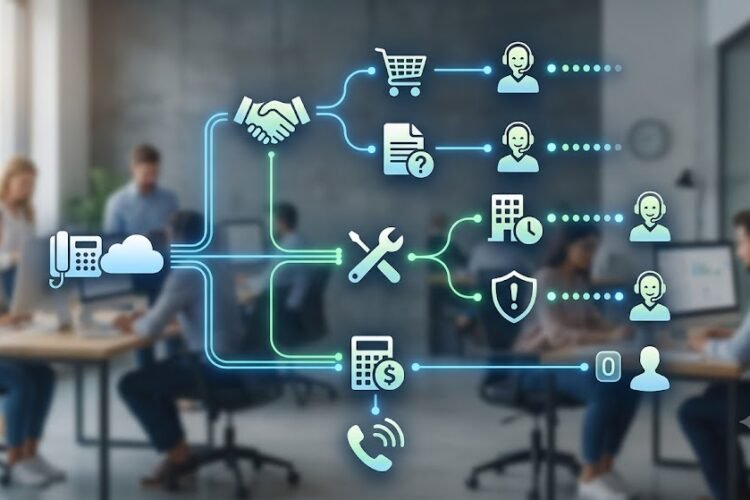
First impressions matter. An automated IVR functions as your digital receptionist, greeting callers with a customized menu (e.g., “Press 1 for Sales, Press 2 for Support”). Modern systems allow you to build deeply nested, intelligent routing trees that guide clients to the correct department without a human operator needing to transfer them manually.
Native CRM Integration
When your phone system talks directly to your customer relationship management (CRM) software, workflows change dramatically. When a client calls in, your system can automatically trigger a pop-up on the agent’s screen displaying the caller’s name, historical purchase data, and recent support tickets before the agent even says hello.
Automatic Call Recording and Analytics
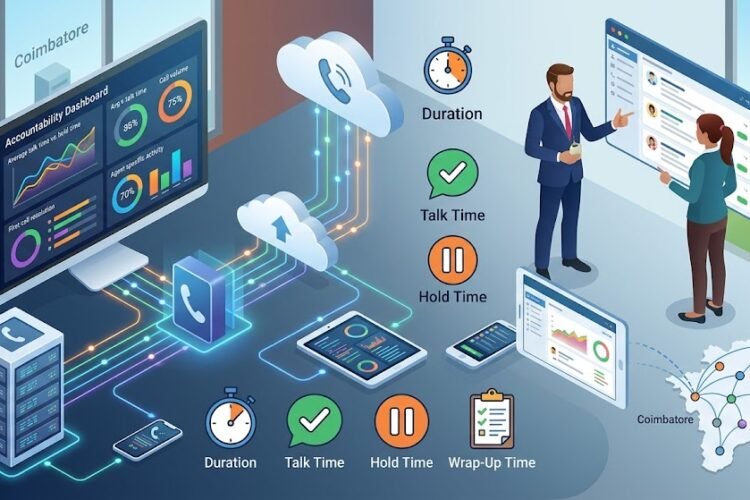
For compliance, training, and quality assurance, having a robust recording system is mandatory for modern customer service operations. Cloud and hybrid setups make storing, organizing, and retrieving call audio incredibly straightforward. Pair this with real-time analytics dashboards, and managers can monitor hold times, dropped call rates, and peak traffic windows on the fly.
Frequently Asked Questions
Can I use my existing office wiring for a pure IP PBX system?
Yes, provided your office is wired with standard Category 5e or Category 6 ethernet cables. If your building only features old-school 2-wire copper telephone cabling, you will either need to run new ethernet drops, implement a wireless system, or use hybrid hardware gateways to bridge the gap.
What is the actual difference between an IP PBX and an old traditional PBX?
Traditional PBX systems rely on physical, proprietary hardware switches and analog phone lines provided by telecom companies. An IP PBX functions entirely over internet protocols, routing voice calls as digital data packets. This eliminates expensive long-distance line costs and allows for seamless remote access and software integrations.
What happens to my business phone system if the internet goes down?
If you are running a cloud-based system, your automated greetings, voicemail, and mobile apps will continue working perfectly because the core server is hosted in an external data center. Calls can be automatically redirected to employees’ mobile phones. For on-premise systems, setting up a backup cellular gateway or a secondary internet connection ensures your lines never go dark.
How many concurrent phone calls can a typical SIP trunk handle?
Unlike traditional physical phone lines that are hard-limited by the number of physical wires running into your building, a SIP trunk is limited purely by your internet bandwidth. A standard high-speed business fiber connection can easily support hundreds of concurrent, high-definition voice calls simultaneously without a dip in quality.
Building for Long-Term Growth
Investing in the right components today ensures your business doesn’t get left behind as communication tech continues to advance. By pairing a robust routing engine with the right gateways, reliable network switches, and smart software integrations, you create an agile, ultra-cost-effective workspace that can scale smoothly alongside your ambitions.