Automating Call Logging: Why Manual Entry is Hurting Your Sales
The Silent Sales Killer Nobody Talks About
Picture this: your best sales rep just wrapped up a promising call with a potential client in Coimbatore. The conversation went well, the client seemed interested, and a follow-up was promised. But by the time your rep finishes typing notes into a spreadsheet or CRM, half the details have already blurred. Was it Tuesday or Wednesday the client wanted a callback? Did they mention a budget range, or was that a different lead entirely?
This scenario plays out in sales teams across Chennai and Coimbatore every single day. Manual call logging isn’t just tedious — it’s quietly draining revenue from businesses that don’t even realize it’s happening. And the worst part? Most sales leaders blame their team’s performance instead of the outdated process forcing that performance to suffer.
What Manual Call Logging Actually Costs You
Let’s break down the real damage manual entry does, beyond the obvious “it’s annoying” complaint.
Every minute your sales team spends typing call summaries, updating spreadsheets, or hunting for the right CRM field is a minute they’re not spending on the next call. Multiply that by ten calls a day, across a ten-person sales floor, and you’re looking at hours of lost selling time — every single day.
Then there’s accuracy. Human memory is unreliable, especially after back-to-back calls. Details get mixed up, follow-up dates get misremembered, and critical customer pain points get summarized so briefly they lose all meaning. When a manager later reviews these logs to coach the team or forecast revenue, they’re working with incomplete or distorted data.
The Compounding Effect on Sales Performance
Manual logging doesn’t just cause isolated mistakes — it compounds over time. Missed follow-ups lead to lost deals. Inconsistent notes make it impossible to track which pitch angles are actually converting. And when reps switch roles or leave the company, the informal, half-recorded history they kept in their heads simply disappears, taking valuable customer context with it.
This is precisely why many businesses in the manufacturing and hospitality sectors around Chennai have already begun shifting from traditional systems toward smarter, integrated communication infrastructure. Sales-driven businesses are no exception — the same logic that pushes factories toward automation applies directly to how sales teams handle customer conversations.
How Automated Call Logging Actually Works
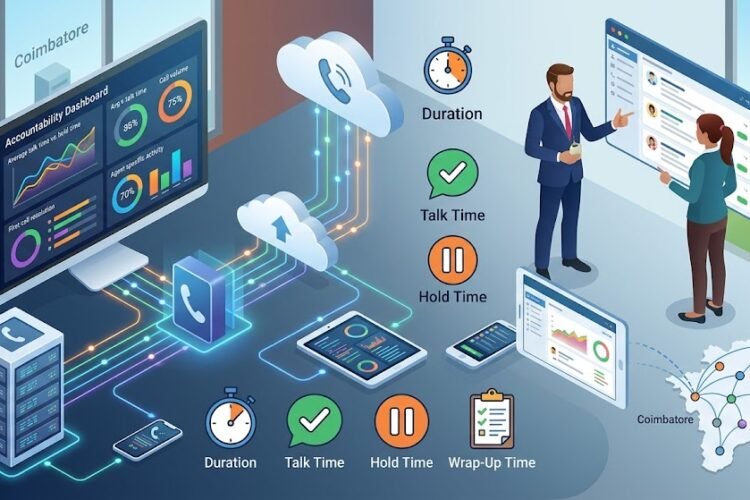
An automated call logging system, when paired with a modern IP PBX system, captures every inbound and outbound call automatically — no manual typing required. The system records the caller’s number, call duration, time stamp, and outcome, then pushes that data directly into your CRM or sales dashboard in real time.
This isn’t a futuristic concept reserved for large enterprises. Coimbatore-based businesses of all sizes are now adopting this approach because the technology has become far more accessible and affordable than it was even two years ago.
The Role of CRM Integration
The real magic happens when call logging connects seamlessly with your existing CRM. Instead of your sales team switching between three different tools to find a customer’s history, everything lives in one place. When a call comes in, the system automatically matches the caller’s number to an existing contact and pulls up their entire interaction history — past calls, notes, deal stage, everything.
This is the foundation of what’s often called screen pop functionality, where a customer’s profile appears on the rep’s screen the moment the phone rings. No searching, no guessing, no awkward “can you remind me who you are again?” moments that damage customer trust.
For businesses already exploring this shift, understanding how to integrate your IP PBX with your CRM is usually the natural next step, since the two systems need to talk to each other for automation to work properly.
Real-Time Data Instead of End-of-Day Guesswork
One of the most underrated benefits of automated logging is timing. Traditional manual entry often happens hours after a call — sometimes at the end of the day when the rep is exhausted and rushing through a backlog of notes. By then, memory has already faded.
Automated systems log the call the moment it ends. There’s no delay, no backlog, and no reliance on a tired brain trying to reconstruct a conversation from three hours earlier. Sales managers get a live, accurate picture of team activity instead of a rushed summary written at 6 PM.
Why This Matters More for Growing Sales Teams
Small and mid-sized sales teams often assume automation is something to “graduate into” once they’re bigger. In reality, the opposite is true — the earlier a growing team builds automated habits, the fewer bad habits it has to unlearn later.
The Hidden Training Problem
When call logging is manual, training new sales reps becomes inconsistent. Each rep develops their own shorthand, their own note-taking style, and their own definition of what counts as a “qualified lead.” This makes it nearly impossible for managers to compare performance fairly or identify what’s actually working.
Automated systems standardize this from day one. Every call is logged the same way, with the same data points, regardless of who’s on the phone. This makes onboarding faster and performance reviews far more objective, since managers are comparing consistent data instead of subjective notes.
Better Forecasting, Fewer Surprises
Sales forecasting is only as good as the data feeding it. If your CRM is full of vague or missing call notes, your revenue projections are essentially guesses dressed up as strategy. Automated call logging feeds clean, structured data into your pipeline reports, which means forecasts based on actual call volume, conversation outcomes, and follow-up timing — not on what a rep remembers to type.
This connects closely to broader themes around measuring the ROI of upgrading your telephony systems, where accurate data collection is consistently cited as one of the biggest returns businesses see after moving away from legacy phone infrastructure.
The Connection Between Call Logging and Call Center Metrics
If your sales team also handles a moderate volume of inbound inquiries, automated call logging becomes even more valuable. It directly feeds into the kind of call center metrics that actually matter — average handling time, first-call resolution, follow-up conversion rates, and more.
Without automation, these metrics are either estimated or ignored entirely. With it, they become a genuine strategic tool. You can identify which reps close deals fastest, which follow-up windows convert best, and which lead sources produce the highest-quality conversations.
Where ACD and IVR Fit Into the Picture
For businesses running a slightly more structured sales or support operation, understanding the difference between ACD and IVR systems helps clarify how calls get routed before they even reach a rep. When routing is smart, the call logging that happens afterward becomes even more valuable, since calls are already being directed to the right person based on skill, availability, or customer history.
Why Coimbatore and Chennai Businesses Are Making the Switch Now
There’s a reason this shift is accelerating specifically in Tamil Nadu’s business hubs. Competition among local businesses — whether in textiles, manufacturing, hospitality, or professional services — has intensified, and sales efficiency has become a genuine differentiator rather than a nice-to-have.
Many companies are realizing that why competitors in Chennai are switching to IP PBX systems isn’t just about saving on phone bills. It’s about the operational advantages that come bundled with modern systems, automated call logging being one of the most immediately impactful.
The Cost of Staying With Manual Systems
Sticking with outdated, manual processes isn’t a neutral choice — it’s an active cost. Beyond the lost selling time already mentioned, there’s the ongoing risk of the hidden costs of legacy phone infrastructure quietly piling up in the background: maintenance headaches, limited scalability, and a growing gap between what your systems can do and what your competitors’ systems can do.
When you factor in the cost efficiency comparison between analog and IP systems, the case for automation becomes even clearer. Modern IP-based systems typically cost less to maintain long-term while offering capabilities — like automated call logging — that legacy analog systems simply cannot replicate.
Getting Started With Automated Call Logging
If your sales team is still relying on manual entry, the good news is that the transition doesn’t have to be disruptive. Most modern IP PBX systems are designed to integrate with popular CRM platforms with minimal configuration, and the learning curve for sales reps is often shorter than expected since the system does the heavy lifting automatically.
What to Look For in a System
Not every phone system offers robust call logging automation, so it’s worth being selective. Look for systems that support real-time CRM syncing, automatic call recording for reference and training purposes, and detailed reporting dashboards that go beyond basic call counts.
Businesses exploring this upgrade often pair automated logging with automatic call recording, since recorded calls provide a valuable backup reference and training resource when combined with structured logged data.
The Productivity Ripple Effect
The benefits of automation rarely stay contained to just one department. Once call logging is automated for sales, many businesses notice a broader shift in employee productivity across modern phone systems, as teams spend less time on administrative busywork and more time on actual customer-facing work.
Final Thoughts: Stop Letting Manual Entry Bleed Revenue
Manual call logging feels like a small, manageable inconvenience — until you calculate the cumulative cost in lost time, missed follow-ups, and inaccurate forecasting. For sales teams in Chennai and Coimbatore competing in increasingly crowded markets, this is no longer a minor operational detail. It’s a genuine competitive disadvantage.
Automating call logging through an integrated IP PBX and CRM setup isn’t about replacing your sales team’s judgment — it’s about giving them accurate, real-time data so they can focus on what they do best: building relationships and closing deals.
Frequently Asked Questions
Does automated call logging work with any CRM system?
Most modern IP PBX systems support integration with widely used CRM platforms through APIs or built-in connectors. It’s best to confirm compatibility with your specific CRM before upgrading, though most popular platforms are supported out of the box.
Will automated call logging replace the need for sales reps to take notes?
Not entirely. Automated logging captures call metadata like duration, timestamp, and caller details automatically, but reps can still add qualitative notes about customer needs or objections. The goal is to reduce administrative burden, not eliminate human insight.
Is automated call logging expensive to set up for a small sales team?
Setup costs vary depending on team size and existing infrastructure, but many businesses find the investment pays for itself quickly through recovered selling time and improved conversion tracking.
How long does it take to migrate from manual logging to an automated system?
For most small to mid-sized sales teams, migration typically takes a few days to a couple of weeks, depending on how much historical data needs to be transferred and how complex the CRM integration is.
Can automated call logging help with sales team training?
Yes. Consistent, standardized call data combined with call recordings gives managers concrete examples to use during training, making it easier to identify what top performers do differently from the rest of the team.