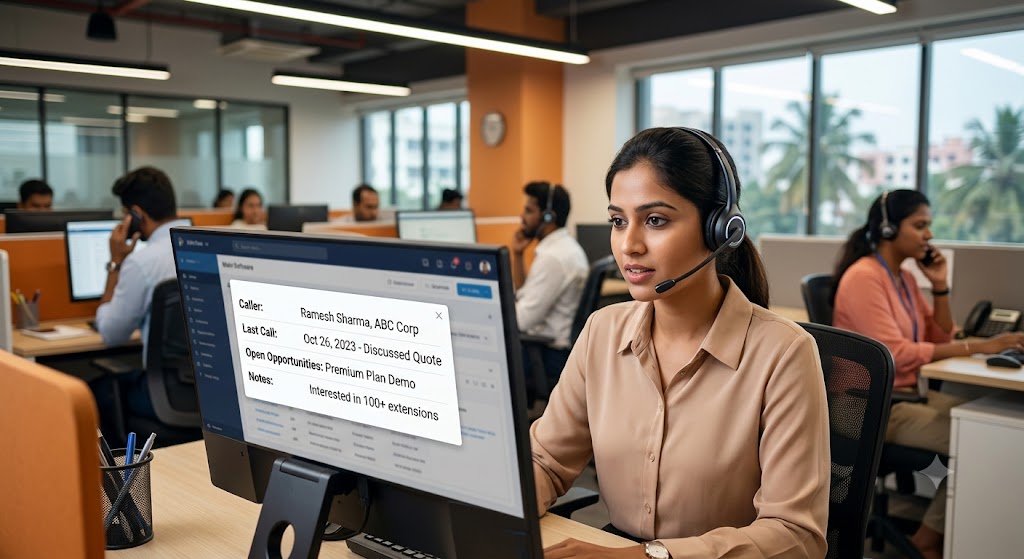
Picture this: your sales rep’s phone rings. Before they even say “hello,” a window pops up on their screen showing the caller’s name, their last purchase, every previous conversation, and even a note from the last call saying “wants a demo of the premium plan.” No frantic searching. No awkward “sorry, can you remind me who you are?” That’s screen pop technology — and it’s quietly becoming one of the most underrated tools in a sales team’s arsenal.
If your Coimbatore or Chennai sales floor is still running on sticky notes and guesswork, this feature alone could be the reason your competitors are closing deals faster than you.
What Exactly Is Screen Pop Technology?
Screen pop is a feature built into modern IP PBX systems that automatically displays caller information on a salesperson’s screen the moment a call comes in — before they even pick up the receiver. It pulls data from your CRM, past call logs, and customer records, then presents it instantly.
Think of it as a cheat sheet that appears out of nowhere, except it’s not cheating — it’s just smart technology doing what it should have been doing all along.
Where the Data Comes From
Screen pop doesn’t work in isolation. It relies on integration between your phone system and your customer database. This is why businesses upgrading to IP PBX systems often pair the feature with proper CRM syncing, something we’ve covered in detail in our guide on IP PBX systems with CRM integration for Chennai and Coimbatore businesses.
Why Sales Teams Struggle Without It
Let’s be honest about the pain points, because pretending they don’t exist helps nobody.
The “Who Is This Again?” Problem
Salespeople juggle dozens, sometimes hundreds, of leads. Without context, every call feels like starting from zero. That awkward pause while someone scrambles through spreadsheets or asks a colleague “do we know this person?” isn’t just embarrassing — it costs deals.
Lost Time Adds Up Fast
Even if a rep eventually finds the right customer record, that search might take 30 to 60 seconds per call. Multiply that across a busy call center handling hundreds of calls a day, and you’re looking at hours of wasted productivity every single week. We broke down similar inefficiencies in our piece on call center metrics that actually matter — response time and handling time are two numbers screen pop directly improves.
Missed Personalization Kills Trust
Customers notice when a business treats them like a stranger, especially if they’ve called before. A rep who says “I see you called last week about the pricing plan, did you get a chance to review it?” builds instant credibility. One who says “sorry, can you explain your issue again?” quietly erodes it.
How Screen Pop Actually Transforms the Sales Process
Faster, More Confident Conversations
The moment a call connects, your rep already knows the caller’s name, company, purchase history, and open queries. There’s no fumbling. This confidence translates directly into a more persuasive, natural-sounding pitch — which matters enormously in competitive markets like Chennai and Coimbatore where customers have plenty of alternatives.
Higher Conversion on Repeat Calls
Returning customers are the easiest to convert because they’ve already shown interest. Screen pop makes sure your team never treats a warm lead like a cold one. This ties closely into broader productivity gains covered in our article on how modern phone systems are increasing employee productivity.
Better First Impressions for New Leads
Even for first-time callers, screen pop can display information pulled from web forms, ad campaigns, or marketing tools — so your rep knows exactly which product or service the person is interested in before saying a single word.
Reduced Call Handling Time
Because reps don’t waste time asking for basic details the system already has, average call duration drops while customer satisfaction rises. We explored this connection in our post on boosting customer satisfaction with faster call handling.
Screen Pop and the Bigger Picture: IVR and ACD
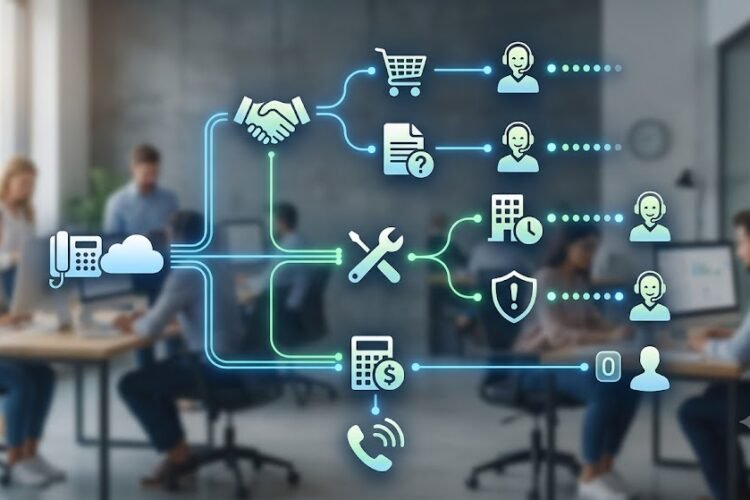
Screen pop rarely works alone. It’s most powerful when paired with intelligent call routing systems like ACD (Automatic Call Distribution) and IVR (Interactive Voice Response), which decide which agent gets the call in the first place.
Routing the Right Call to the Right Rep
An IVR system can identify why a customer is calling — sales inquiry, support issue, billing question — and route it to the most relevant team member. Combine that with screen pop, and the receiving rep gets both the right call and the right context simultaneously. Our detailed comparison of ACD versus IVR and how they form the backbone of modern call centers explains this relationship further.
Multi-Level IVR for Complex Sales Teams
Larger sales floors with multiple product lines benefit from multi-level IVR menus that segment callers before they even reach a human. Screen pop then adds the finishing touch by surfacing account-specific details. Read more in our guide on configuring multi-level IVR for IP EPABX systems.
Real Business Impact: What Changes on the Ground
Shorter Sales Cycles
When reps aren’t wasting the first two minutes of every call gathering basic information, they can move straight into value-driven conversation. That shaves real time off the sales cycle, especially for businesses managing high call volumes.
Better Team Accountability
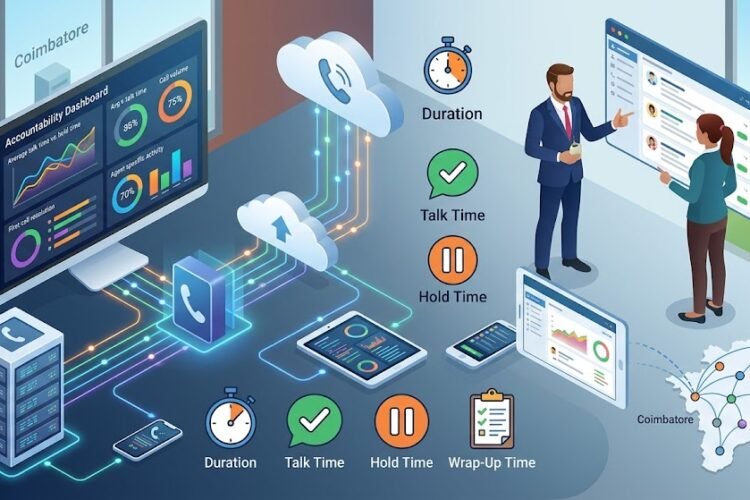
Screen pop systems typically log call outcomes automatically, tying directly into call recording and reporting tools. This creates a clear trail of what was discussed and what was promised, reducing internal confusion. Our article on IP PBX systems with automatic call recording for customer support centers covers how this recorded history supports both sales and compliance needs.
Measurable ROI
Every technology investment eventually gets questioned by leadership: was it worth it? Screen pop’s ROI shows up in reduced call times, higher conversion rates, and improved customer retention — all measurable, all trackable. For a broader framework on evaluating returns, see our guide on measuring ROI when upgrading your IP telephony system.
Why Coimbatore and Chennai Businesses Are Paying Attention
Local businesses are increasingly aware that customer expectations have shifted. A caller in 2026 doesn’t want to repeat themselves — they expect the business to already know who they are, much like an e-commerce app that remembers their cart.
Competitive Pressure Is Real
Businesses that delay upgrading their phone infrastructure risk falling behind competitors who’ve already modernized. We’ve seen this trend firsthand, which is why we wrote about why competitors across Chennai are switching to IP PBX systems.
It’s Not Just for Call Centers Anymore
While screen pop originated in large call center environments, it’s now accessible to small and mid-sized sales teams too, particularly with cloud-based IP PBX solutions. If you’re running a leaner setup, our guide on cloud-based call center solutions for Coimbatore businesses shows how affordable this has become.
Getting Started: What Your Business Needs
A Compatible IP PBX System
Not every legacy PBX supports screen pop. Businesses still running older analog systems will need to evaluate an upgrade path first.
CRM or Customer Database Integration
Screen pop is only as useful as the data behind it. A clean, well-maintained CRM is non-negotiable for this feature to deliver real value.
Staff Training
Even the best technology underperforms if your team doesn’t know how to use the information presented to them. A short training session on interpreting and acting on screen pop data goes a long way.
Common Mistakes Businesses Make
Treating It as a “Nice-to-Have”
Some businesses view screen pop as a luxury feature rather than a core productivity tool. In reality, the time savings alone often justify the investment within months.
Ignoring Data Hygiene
If your CRM has duplicate entries, outdated contact details, or incomplete records, screen pop will surface inaccurate or missing information — undermining the very trust it’s meant to build.
Skipping the Integration Step
Simply having an IP PBX and a CRM isn’t enough; they need to be properly connected. This is where working with an experienced provider makes the difference between a feature that works flawlessly and one that frustrates your team.
Frequently Asked Questions
Does screen pop work with any CRM software?
Most modern IP PBX systems support integration with popular CRMs, though compatibility varies by provider. It’s best to confirm integration support before choosing a system.
Is screen pop only useful for large call centers?
No. Small and mid-sized sales teams benefit just as much, often even more, since every missed personalization opportunity has a bigger relative impact on a smaller customer base.
How long does it take to set up screen pop functionality?
Setup time depends on your existing infrastructure, but with a properly configured IP PBX and CRM integration, most businesses can have it running within a few days.
Will screen pop slow down my phone system?
No. Screen pop operates in the background and displays information almost instantly as the call connects, with no noticeable delay for either party.
Can screen pop work with mobile or remote sales teams?
Yes, provided your IP PBX system supports mobile extensions or softphone apps, screen pop data can be pushed to remote and on-the-go sales staff just as easily as desk-based teams.
The Bottom Line
Screen pop isn’t flashy, and it won’t make headlines. But it quietly reshapes how your sales team operates — one call at a time. Reps sound more prepared, customers feel more valued, and your business closes more deals with less friction. In markets like Chennai and Coimbatore, where customer patience is thin and competition is thick, that small window popping up on a screen might just be the edge your sales team has been missing.