In the fast-paced business hubs of Chennai and Coimbatore, the first impression a customer receives often happens through a phone call. Imagine a potential client calling your office, only to be met with a busy signal or a confused receptionist who transfers them three times. Frustrating, right? This is where mastering Multi-level IVR configuration for IP EPABX systems becomes a game-changer for your brand.
An Interactive Voice Response (IVR) system isn’t just a “press 1 for sales” recording; it is your digital concierge. When configured correctly within a modern IP-based PBX, it acts as a tireless traffic controller, ensuring every caller reaches the right expert without delay.
Why Your Business Needs a Multi-level IVR Strategy
Traditional, single-level IVRs are often too limited for growing enterprises. If you have multiple departments, such as Sales, Technical Support, Accounts, and HR, a flat menu becomes cluttered. Multi-level IVR allows for a nested hierarchy. For instance, a caller selects “Support,” which then opens a sub-menu for “Software Troubleshooting” or “Hardware Repair.”
This depth is crucial for high-performance environments. If you are currently setting up a high-performance call center infrastructure setup, the IVR is the backbone of your inbound call flow. It reduces the “Human Touch” requirement for basic routing, allowing your skilled staff to focus on solving complex issues rather than acting as a switchboard.
Technical Prerequisites: Preparing for Configuration
Before diving into the dashboard of your Grandstream, Matrix, or NEC system, you need to ensure your underlying hardware is ready. A seamless IVR experience depends on low latency and clear voice packets.
1. Bandwidth and Network Stability
Since IP EPABX systems rely on VoIP, your internet connection must be robust. You should check your network infrastructure maintenance to ensure that Voice over IP (VoIP) traffic is prioritized via Quality of Service (QoS) settings.
2. Choosing the Right Hardware
Whether you are using an open-source Asterisk-based system or branded hardware, the logic remains similar. However, there is often a debate on which is better. You can read more about the pros and cons of open-source Asterisk vs branded hardware to see which fits your technical capability.
Step-by-Step: Multi-level IVR Configuration for IP EPABX Systems
Configuring a multi-level IVR requires a blend of logical mapping and technical execution. Here is how experts approach the setup:
Mapping the Caller Journey
Don’t start with the software; start with a piece of paper. Draw a flowchart.
-
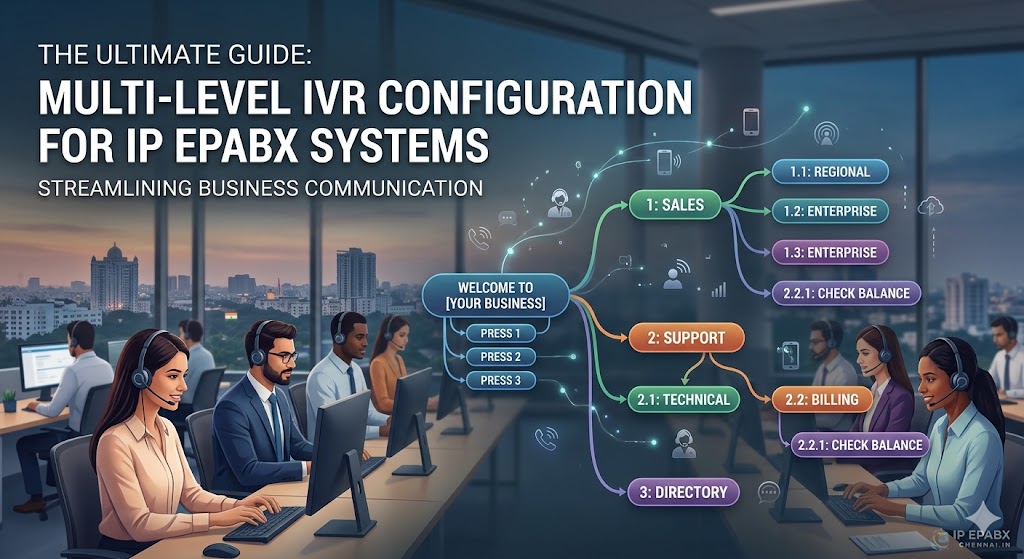
Level 1: Welcome Message + Primary Options (Sales, Support, Billing).
-
Level 2: Specific Options (e.g., under Support: IP Phones, Gateways, or Bio-metrics).
-
Level 3: Final Destination (Ring Group, Queue, or Voicemail).
Uploading High-Quality Audio Prompts
The “Voice” of your company matters. Avoid using grainy recordings made via a handset. Use professional text-to-speech tools or hire a voice artist. Ensure the files are in the correct format (usually .wav or .gsm) required by your system. If you are using advanced systems like those from NEC EPABX solutions, the interface makes it easy to manage these libraries.
Setting Up the “Time Conditions”
Your IVR should behave differently at 2:00 PM versus 2:00 AM. Configure “Time Conditions” so that after-hours callers are greeted with an “Office Closed” message or directed to an emergency remote extension. This is a vital part of IP EPABX lifecycle management to ensure 24/7 professional presence.
Integrating Gateways for Legacy Support
Often, businesses in Coimbatore or Chennai still rely on analog lines or GSM trunks while using a modern IP PBX. To make your Multi-level IVR work across these lines, you need gateways.
-
GSM Integration: Use a Dinstar GSM gateway to route mobile calls directly into your IVR.
-
Analog Extensions: If you have old analog phones in certain departments, you’ll need to know how to connect an analog extension to an IP PBX using an FXS gateway.
Avoiding the “IVR Jail”: Best Practices for User Experience
We have all been stuck in a loop where we can’t find a human. To prevent “IVR Jail” and keep your customer satisfaction scores high, follow these rules:
Keep Menus Short
No one wants to listen to ten options. Limit each level to a maximum of 4 or 5 choices. If you need more, that’s exactly why you use a Multi-level IVR configuration for IP EPABX systems—to break them down logically.
The “Exit to Human” Option
Always provide an option (usually ‘0’ or ‘9’) to speak to a live agent. Even the best IVR cannot replace human empathy in urgent situations.
Inform Callers of Queue Status
If the IVR leads to a call queue, use your system to announce the estimated wait time. This transparency is a hallmark of complete call center solutions.
The Role of CRM Integration in Advanced IVR
Modern Multi-level IVR configuration for IP EPABX systems allows for “Data-Directed Routing.” If your IP PBX is integrated with a CRM, the system can recognize the caller’s phone number.
Imagine a “Gold Category” client calling; the IVR can automatically skip the main menu and route them directly to their dedicated account manager. Businesses looking for this edge should explore an IP PBX system with CRM integration.
Security Considerations for Your IVR
An IVR is a gateway to your internal phone system, which makes it a potential target for “Toll Fraud.” Hackers sometimes try to exploit IVR prompts to gain access to outbound dialing lines.
To prevent this, ensure your system is patched and follow a strict IP PBX maintenance guide. Never allow the IVR to “Transfer to External Number” unless it is password-protected or restricted to specific authorized numbers.
Troubleshooting Common IVR Issues
Even with the best setup, issues like echo or lag can ruin the caller experience.
Dealing with Latency
If callers complain that they press a button but the system doesn’t respond, it might be a DTMF (Dual-Tone Multi-Frequency) mismatch. Ensure your SIP trunk and PBX are using the same DTMF method (usually RFC2833). For more on audio quality, see our guide on troubleshooting echo and voice lag.
Silent Menus
If a caller hears silence instead of your greeting, check your audio file permissions and paths. It is also wise to check your IP phone system backup and recovery guide in case a configuration error requires a system roll-back.
Is It Worth the Investment for Small Businesses?
Many small office owners wonder if such a complex setup is necessary. The reality is that an IVR makes a 3-person office look like a 30-person corporation. It provides structure and ensures no lead is dropped. If you are worried about the budget, there are many small business phone systems under 50k that support full multi-level IVR capabilities.
Frequently Asked Questions (FAQs)
What is the difference between an IVR and an Auto-Attendant?
An auto-attendant is a simple “point-to-point” router (Press 1 for Sales). A Multi-level IVR is an interactive system that can collect data, access databases, and offer multiple layers of sub-menus.
Can I use my mobile phone as an extension in the IVR?
Yes! With modern IP EPABX with mobile app integration, your IVR can route calls to an app on your smartphone, making it perfect for remote work.
How many levels can an IVR have?
Technically, most IP PBX systems allow for infinite levels, but for the sake of customer sanity, it is recommended to stay within 2 to 3 levels.
Do I need a special SIP trunk for IVR?
No, any standard SIP trunk will work. However, you must configure the SIP trunk correctly to ensure the signals (DTMF) are passed correctly so the IVR recognizes the caller’s key presses.
Can the IVR work during a power outage?
Only if your server or cloud PBX is online. For on-premise systems, a UPS is essential. If you use a cloud-based IP PBX, the IVR stays active in the cloud even if your office power goes out, directing calls to mobile phones.
Conclusion: Future-Proofing Your Communication
Mastering Multi-level IVR configuration for IP EPABX systems is one of the most effective ways to boost operational efficiency and customer satisfaction. By guiding your callers through a logical, well-recorded, and fast-responding menu, you reduce frustration and maximize the productivity of your team.
Whether you are a startup in Coimbatore or a manufacturing giant in Chennai, your telephony system is your lifeline. Don’t settle for a basic “Hello.” Build a professional, multi-layered communication gateway that grows with your business. If you need help choosing the right hardware to support these features, consider comparing industry leaders like Grandstream vs Matrix to find your perfect match.