Imagine Making a Call, but Your Voice Travels Like an Email
Every day, millions of business professionals and remote workers lift their phones, tap a screen, and connect with someone across the globe in seconds. There is no static, no fuzzy connection, and remarkably, no traditional phone line involved. Instead, the voice is carved into tiny digital packets, sent racing across the internet alongside emails, cat videos, and streaming data, and reassembled perfectly on the other end.
This is the magic of Voice over Internet Protocol, or VoIP.
While it feels like a standard phone call, the underlying mechanics are completely different from the century-old copper wire grid. If you have ever wondered exactly how your voice transforms into digital data and lands effortlessly in someone else’s ear, you are in the right place. Let’s pull back the curtain on modern telecommunications and explore how this game-changing technology actually works.
The Death of the Copper Wire: From PSTN to the Cloud
To understand why VoIP is such a massive leap forward, it helps to look at what it replaced. For over a hundred years, the world relied on the Public Switched Telephone Network (PSTN).
The Old Way: Circuit Switching
The traditional phone system uses circuit switching. When you dialed a number, the telecom provider dedicated a physical copper wire circuit exclusively to your conversation for its entire duration. If you stayed silent for two minutes, that physical line remained open and completely unused by anyone else. This was incredibly inefficient and expensive to maintain, which is why international calls used to cost a fortune.
The Modern Way: Packet Switching
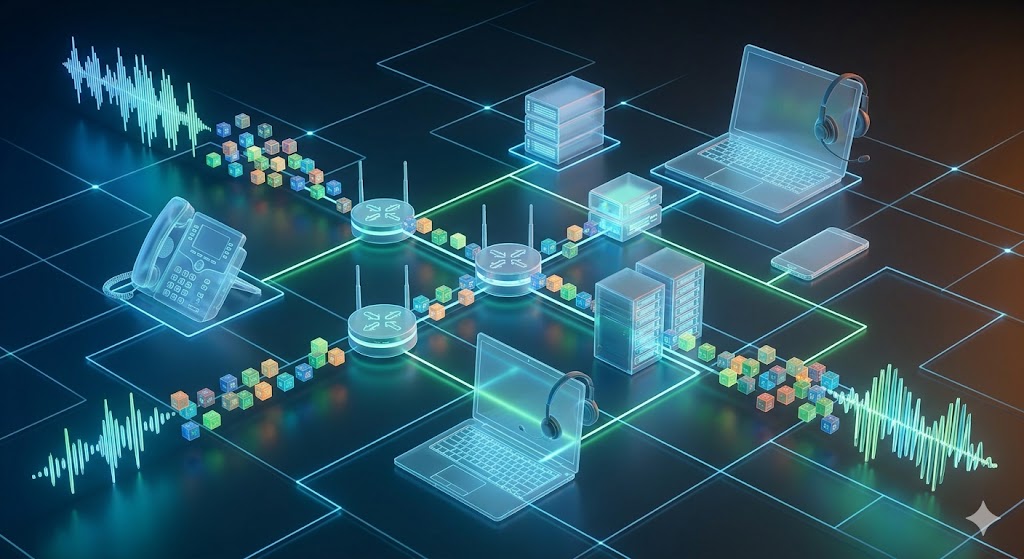
VoIP completely rewrites this script using packet switching. Instead of keeping a dedicated highway open for one conversation, your voice is broken down into small, efficient digital data packets. These packets travel over the shared infrastructure of the internet, finding the fastest routes independently, and piece themselves back together at the destination.
Because the internet handles millions of data packets simultaneously, this method maximizes network efficiency. It is the fundamental shift that allows a small office to get a robust voip pbx for small business complete guide 2025 up and running without laying down a single extra inch of copper wire.
Step-by-Step: The Journey of a VoIP Data Packet
Let’s look at the technical journey your voice takes during a typical internet-based call. The entire process described below happens in a mere fraction of a second—so fast that the human brain perceives it as instantaneous.
Step 1: Analog to Digital Conversion (ADC)
Your voice produces acoustic sound waves. Computers and IP networks do not understand sound waves; they only understand binary code ($0$s and $1$s). The moment you speak into a VoIP microphone, the hardware captures the analog audio waves and immediately converts them into digital data.
Step 2: Compression and Encoding (The Codec)
Raw digital audio is massive. To prevent it from choking your internet bandwidth, a software algorithm known as a Codec (Coder-Decoder) compresses the audio file. The codec strips out frequencies that the human ear cannot easily hear, packing the audio into a highly optimized format.
Step 3: Packetization and Labeling
Once encoded, the continuous digital stream is chopped into tiny fragments called packets. Each packet is wrapped in a digital “envelope” containing crucial routing information. This includes:
-
The sender’s IP address
-
The recipient’s IP address
-
A sequence number (so the receiving device knows what order to put them back in)
Step 4: Transmission Across the Web
The packets are transmitted into the open internet or a local area network (LAN). They do not necessarily travel together. Packet A might take a route through a server in Mumbai, while Packet B passes through Bengaluru. They race across routers and switches to reach the target destination.
Step 5: Jitter Buffering and Reassembly
When the packets arrive at the recipient’s device, they frequently land out of order or with slight timing variations (a phenomenon known as jitter). A jitter buffer holds the packets for a millisecond to let late arrivals catch up. The receiving device then reads the sequence numbers and pieces the audio fragments back together in the exact order they were spoken.
Step 6: Digital to Analog Conversion (DAC)
Finally, the reassembled digital data is fed through a digital-to-analog converter. The digital bits turn back into physical sound waves, which vibrate the speaker of the recipient’s phone or headset, allowing them to hear your voice crystal clear.
The Brains of the Operation: Protocols and Codecs
Behind every smooth voice transmission sits a strict set of rules and algorithms that handle the heavy lifting. Without these standardized systems, devices from different manufacturers wouldn’t be able to talk to one another.
The Role of Signaling Protocols
Before any voice data can travel, a connection must be established. This is handled by signaling protocols, the most dominant of which is the Session Initiation Protocol (SIP).
Think of SIP as the digital operator. It handles dialing the number, ringing the target phone, checking if the line is busy, and gracefully hanging up the call when you are finished. To dive deeper into how this works for enterprises, exploring a comprehensive understanding sip trunking guide non technical business owners provides a clear view of how virtual phone lines replace physical telecom trunks.
Once SIP establishes the connection, a separate protocol called the Real-time Transport Protocol (RTP) takes over to actually carry the voice packets across the web.
Popular VoIP Codecs
Different codecs balance audio quality against bandwidth consumption. Depending on your network, your system might use different formats:
| Codec Name | Bandwidth Required | Audio Quality | Ideal Use Case |
| G.711 | High (~64 Kbps) | Uncompressed / Excellent | Strong office fiber networks |
| G.729 | Low (~8 Kbps) | Compressed / Good | Mobile data or congested networks |
| Opus | Highly Adaptive | Dynamic / HD Audio | Modern WebRTC applications & video |
The Essential Hardware: What Do You Need to Make a Call?
One of the greatest perks of moving away from traditional telecom setups is flexibility. You aren’t tied down to an old beige box on your desk anymore. A modern internet communication ecosystem functions through a variety of hardware and software configurations.
Branded IP Phones
These look exactly like traditional office desk phones, but they connect directly to your internet router via an Ethernet cable rather than a telephone jack. They have built-in mini-computers that handle codec processing and packetization natively. Companies looking for scalability often transition to options like asttecs ip phones coimbatore business communication guide to give their teams robust desk setups.
Softphones (Applications)
A softphone is simply software that turns an existing computing device into a fully functioning phone interface. By installing an app on your smartphone, tablet, or laptop, you can place and receive corporate calls from anywhere in the world. This software layer seamlessly mimics desktop hardware, proving highly popular for modern hybrid teams.
Analog Telephone Adapters (ATA)
If an organization already owns expensive analog desktop phones and isn’t ready to scrap them, an ATA bridges the generational gap. It is a small hardware adapter that plugs into your old analog phone on one side and your internet router on the other, translating old signals into IP packets.
Gateways for Specialized Networks
In more complex corporate environments, businesses often need to blend cellular networks, landlines, and IP systems together. This is where hardware like a what is gsm gateway office need becomes vital, acting as a bridge that translates cellular SIM card signals directly into the company’s internal VoIP network.
Common Audio Problems (And How to Fix Them)
While internet-based calling is highly efficient, it relies heavily on the quality of your internet connection. Because the web was originally designed for asynchronous data (like loading web pages where a half-second delay doesn’t matter), real-time applications can sometimes hit snags.
Dealing with Echo and Audio Lag
If you have ever heard your own voice echoing back to you a second after you speak, you are experiencing latency problems. When network paths are congested, packets take longer to travel, causing an awkward delay.
Solving the Mystery of Choppy Audio
Choppy audio happens due to packet loss. If your router gets overwhelmed, it might simply drop incoming data packets. If packets containing the middle of your sentence are lost, the receiving phone can only play the pieces it got, leading to a broken, robotic, or clipped conversation.
The Fix: Quality of Service (QoS)
To completely prevent these frustrating scenarios, network administrators configure Quality of Service (QoS) settings on office routers. QoS acts like a high-priority express lane for emergency vehicles. It instructs your router to always give voice and video packets absolute priority over other data. If a massive file download and a customer voice call hit the router at the exact same millisecond, the router slows down the download slightly to ensure the voice call stays flawless and uninterrupted.
Cloud vs. On-Premise: Structuring Your Infrastructure
When deploying an internet-based phone network, businesses generally must choose between keeping the processing power local or hosting it in the cloud.
On-Premise Deployments
In an on-premise setup, your business owns and physical runs the central routing server—the IP-PBX box—inside your own server room. This gives your IT team total, absolute control over security settings, call routing flows, and internal configurations. However, it requires a higher upfront capital investment and an experienced engineering team to handle maintenance and security updates over time.
Cloud-Based Architectures
With a cloud configuration, your business owns no central phone hardware at all. Everything is hosted in an off-site secure data center by a dedicated service provider. Your phones connect directly to the internet, and you manage extension lines, call tracking, and voicemail settings through a web-based portal.
This model eliminates hardware maintenance, making it highly attractive for scaling organizations. If you’re analyzing which path fits your company’s operational footprint, weighing a detailed analysis on cloud vs on premise ip pbx can help determine the long-term cost benefits for your specific architectural needs.
Frequently Asked Questions (FAQs)
How much internet speed do I need for clear VoIP calls?
As a rule of thumb, a standard voice call needs roughly $80\text{ Kbps}$ to $100\text{ Kbps}$ of both upload and download bandwidth. Because this requirement is remarkably low, even a basic high-speed broadband connection can effortlessly handle dozens of concurrent voice calls without breaking a sweat.
Will my internet phones work if the power goes out?
Unlike old analog landlines that drew their electrical power directly from the copper telecom lines, IP phones rely on local power and your internet connection. If your building loses electricity or your internet service provider goes down, your physical desktop IP phones will drop offline. However, because modern cloud systems are highly resilient, calls can automatically failover to backup mobile apps or alternative routing numbers instantly.
Can I keep my existing business phone numbers if I switch?
Yes. Through a legal telecom process known as “local number portability” (LNP), you can legally transfer your existing landline, toll-free, or digital numbers over to your new internet-based service provider so your clients notice absolutely zero disruption.
Is it safe to send corporate voice data over the internet?
When configured correctly, internet calling can be incredibly secure. Modern systems use Secure Real-time Transport Protocol (SRTP) to encrypt the audio packets from endpoint to endpoint. This means that even if a malicious actor manages to intercept the data packets as they travel across the web, they will only hear garbled, unreadable digital noise.