When running a business, communication isn’t just an operational requirement—it is the central nervous system of your entire organization. Yet, many businesses are still tethered to legacy hardware, wondering why their communication feel clunky, expensive, and disconnected.
If you are trying to decide whether to stick with a classic office setup or move your telecom infrastructure to the internet, you have likely run into two massive industry terms: IP PBX and Traditional EPABX.
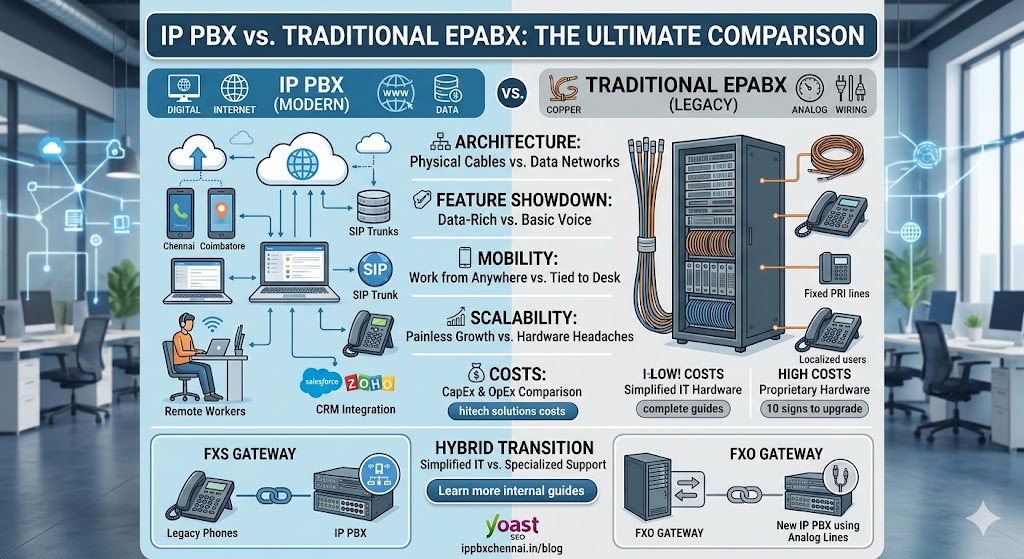
Choosing between them isn’t just a minor tech upgrade. It is a foundational decision that impacts your monthly operational costs, your team’s ability to work remotely, and how effectively you can scale. Let’s break down the technical jargon and look at IP PBX vs. Traditional EPABX: The Ultimate Comparison to find out exactly what your business needs.
Understanding the Basics: What Are We Dealing With?
Before pinning these two systems against each other in a feature-by-feature showdown, we need to understand what each technology actually does under the hood.
What is a Traditional EPABX System?
EPABX stands for Electronic Private Automatic Branch Exchange. It is the classic hardware-driven switching system that has powered corporate office desks for decades.
Traditional EPABX relies on physical copper wires running through your office walls. It connects internal desk phones to one another and routes outbound calls to the public telephone network using standard analog phone lines or ISDN PRI lines.
It is incredibly reliable for basic voice calling, but it is physically rigid. If you want to move a desk phone to another room, you physically have to move or rerun the copper wiring.
What is an IP PBX System?
IP PBX stands for Internet Protocol Private Branch Exchange. Instead of relying on a dedicated web of copper telephone wires, an IP PBX routes your business voice traffic directly over your existing office internet network (LAN) and the wider internet using VoIP (Voice over Internet Protocol).
With an IP PBX, voice signals are converted into digital data packets, sent across the network, and converted back to audio on the other end. Because it uses data networks, it doesn’t care where you physically are. An IP PBX can connect a physical IP desk phone in Chennai, a laptop software application in Coimbatore, and a mobile phone app on a remote worker’s device—all to the exact same office phone network.
The Core Architecture: Physical Cables vs. Data Networks
The fundamental difference between these two communication powerhouses lies in their basic infrastructure. Understanding this setup helps explain why one system remains localized while the other offers limitless flexibility.
Traditional Systems: The On-Premise Anchor
A traditional EPABX requires a dedicated, physical server cabinet mounted in your office IT closet. From that box, heavy bundles of telephone cables stream out to every single desk.
If your company grows and you hire 10 new people, your IT team must check if there are empty physical line cards inside that cabinet. If the box is full, you have to buy expensive new hardware modules just to plug in a few more phones. This rigid structure makes complete EPABX installation guide business setup an exhaustive physical planning process.
IP Systems: Leveraging Your Existing Network
An IP PBX completely eliminates the need for separate telephone wiring. It shares the exact same internet cables (or Wi-Fi network) that your computers already use.
This creates a highly flexible environment. If you want to know what is ip pbx system complete guide modern businesses find so appealing, it is the total lack of physical constraints. Managing it doesn’t require a specialized telecom engineer to splice wires; it can be controlled via a simple, web-based software dashboard by your standard IT staff.
Feature Showdown: Feature-Rich Data vs. Basic Voice
When comparing features, a traditional system gives you exactly what it was built for: clear voice calls, basic call transfers, holds, and simple intercom functionality. It does its job incredibly well, but it stops there.
An IP PBX treats voice communication as data, meaning it can integrate directly with the other software tools your business uses daily. Let’s look at the advanced capabilities that come standard with an internet-driven setup.
Unified Communications (UC)
An IP PBX does not just handle phone calls; it acts as a central hub for video conferencing, instant messaging, file sharing, and voicemail-to-email routing. When a client leaves a voicemail on your office phone, the system automatically converts that audio into an MP3 file and drops it straight into your email inbox. This digital bridge is why the future of business telephony ip epabx unified communications is moving completely away from standalone audio boxes.
Advanced Call Routing and Automation
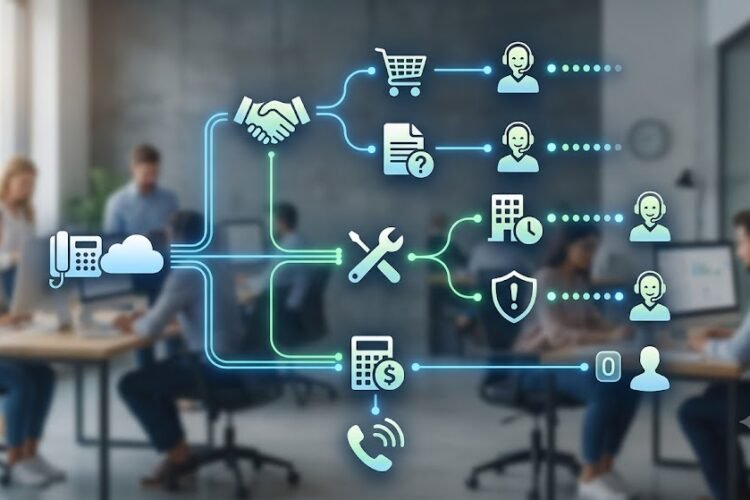
If you operate a customer-facing business, your call flow routing matters. While a traditional system can handle standard routing, an IP PBX allows you to build highly sophisticated, interactive menus. You can easily deploy automated workflows to optimize your operations, such as:
-
Multi-Level Interactive Voice Response (IVR): Build multi-tier menu trees to guide callers precisely to the right department.
-
Skill-Based Routing: Route incoming technical support calls directly to the engineers with the highest certification levels.
-
Automatic Call Distribution (ACD): Evenly distribute heavy inbound call volume across available support agents to keep hold times low.
For organizations building out customer service teams, mastering these tools requires a clear grasp of acd vs ivr understanding the backbone of modern call centers to maximize daily efficiency.
Direct CRM Integrations
Because an IP PBX lives on your computer network, it speaks the same language as your corporate software. When a client calls your office, the IP system can instantly communicate with your Customer Relationship Management (CRM) platform, like Salesforce or Zoho.
Before your agent even picks up the phone, a screen pop appears on their monitor showing the caller’s name, their purchase history, and their open support tickets. Trying to achieve this depth of software integration with an old-school analog box is nearly impossible without buying incredibly expensive, custom mid-tier software bridges.
Mobility and Remote Work: Erasing Office Walls
The modern corporate landscape has shifted permanently toward hybrid work environments. This cultural change has highlighted the steepest functional divide between legacy and modern phone architectures.
The Traditional Trap: Tied to a Desk
With an analog EPABX system, your phone number is hardwired to the physical copper cable sticking out of the wall beneath your desk. If you leave the office to visit a client or work from home for the day, you are completely cut off from the system.
The best you can do is set up absolute call forwarding to send calls to your mobile number. However, when you answer, the call uses expensive standard mobile minutes, and if you try to call a client back, your personal mobile number is exposed on their caller ID rather than your professional business line.
The IP PBX Freedom: Work From Anywhere
An IP PBX does not care about physical locations. It recognizes users based on secure software profiles and login credentials rather than hardware ports.
Your employees can install a software phone application (a “softphone”) directly onto their personal laptops or smartphones. Whether they are working from a coffee shop, an airport lounge, or a home office, they can make and receive calls exactly as if they were sitting at their corporate headquarters desk.
When they dial out, the client sees your official company caller ID. For modern agile teams, utilizing a hybrid ip epabx redefining remote work 2026 setup has become the standard operational framework for maintaining connectivity across distributed teams.
Scalability and Expansion: Painless Growth vs. Hardware Headaches
Every ambitious business plans to grow, but expanding your physical footprint can quickly turn into a logistical headache if your communication system isn’t built to scale gracefully.
Traditional EPABX Scalability Barriers
As mentioned earlier, traditional systems are defined entirely by their physical capacities. When your office runs out of available phone ports on the physical box, growth stalls. You are forced to contact telecom technicians, purchase new physical interface cards, or replace the entire central server unit with a larger model.
This makes tracking costs difficult and turns expansion into a slow, expensive infrastructure project. This rigid nature is why forward-thinking companies are identifying the 10 signs upgrade traditional pbx to ip epabx before physical hardware bottlenecks begin hurting their day-to-day business operations.
IP PBX On-Demand Scalability
Scaling an IP PBX is primarily a software configuration step rather than a construction project. Because it utilizes virtual connections over a data network, adding a new employee to the system is as simple as clicking “Add User” inside your administrative management console.
The network assigns a new virtual extension instantly. You can plug a new physical IP phone into an open network jack, or avoid hardware costs completely by deploying a softphone application to their computer. This elastic architecture is a cornerstone feature detailed within our comprehensive complete guide to ip epabx systems in chennai, demonstrating how scaling up no longer requires costly construction or major physical overhauls.
Financial Analysis: Upfront Investment vs. Long-Term Savings
Let’s look closely at the numbers. While features and mobility are great additions, your communication system has to make long-term financial sense on your balance sheet.
| Financial Metric | Traditional EPABX Systems | IP PBX Systems |
| Initial Capital Expenditure (CapEx) | High (Requires dedicated wiring and proprietary hardware cabinets). | Moderate to Low (Utilizes your existing computer network). |
| Monthly Telecom Line Bills | High (Requires expensive fixed analog lines or dedicated ISDN PRI trunks). | Low (Uses highly cost-effective internet-driven SIP Trunks). |
| Internal Inter-Branch Call Costs | Variable (Charges apply if routing across standard telecom carrier networks). | Free (Completely free voice data packets sent over your corporate WAN/VPN). |
| Maintenance and Changes | High (Requires manual site visits from specialized telecom technicians). | Minimal (Handled remotely or via standard internal IT dashboards). |
The True Cost of Analog Lines
Traditional systems lock you into fixed telecom line agreements. If you purchase an ISDN PRI line, it typically comes packaged with 30 concurrent channels. If your business only needs 12 channels to handle peak calling times, you are still stuck paying for all 30 channels month after month.
The SIP Trunk Revolution
IP PBX systems use highly flexible internet connections called SIP Trunks (Session Initiation Protocol). SIP trunks allow you to purchase exactly the number of concurrent call channels your business actually uses, down to the individual channel.
Furthermore, call rates over internet connections are substantially lower than standard public telephone network lines, especially for long-distance or international calling. By combining these operational optimizations, it becomes clear how real-world firms successfully achieved a massive transformation, as highlighted in the case study showing how hitech solutions reduced communication costs by 40 with ip epabx.
Maintenance, Reliability, and Security
A common concern voiced by operations managers is reliability: “If the internet goes down, does our entire phone system crash with it?” Let’s take a practical look at maintenance, reliability, and system defense for both options.
Power and System Redundancy
It is absolutely true that traditional EPABX copper lines carry their own low-voltage power. If your office suffers a local power outage, standard analog desktop phones will often keep working.
However, an IP PBX is fully capable of matching this level of uptime through modern network design. By utilizing Power over Ethernet (PoE) switches backed up by a central Uninterruptible Power Supply (UPS) in your IT room, your IP phones will remain fully powered during an outage. Furthermore, if your office internet connection fails entirely, an IP PBX can instantly execute failover protocols, automatically rerouting all incoming corporate calls to backup mobile applications or alternative office branch locations seamlessly.
Simplifying Your Infrastructure Support
When an old-school EPABX exhibits line noise, crackles, or dropouts, diagnosing the problem requires physically tracing lines through ceilings and walls.
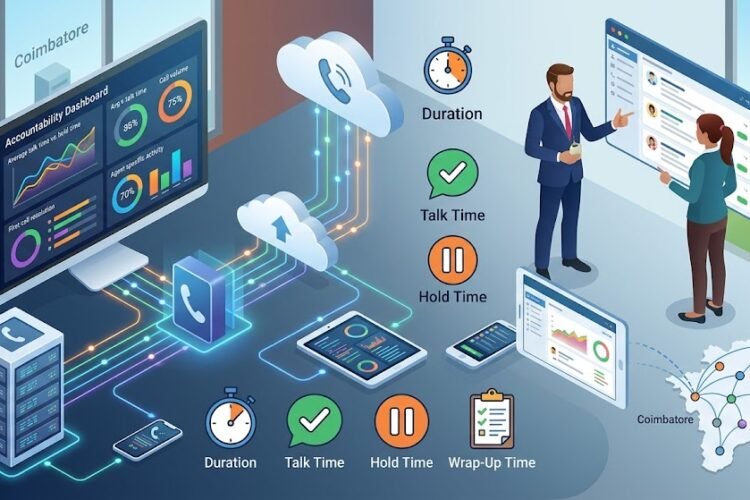
With an IP PBX, your phone network is simply another application running across your standard IT data infrastructure. Your existing IT administrators can monitor voice call traffic quality, adjust settings, and deploy system-wide updates directly from a central software terminal. This unified oversight helps businesses smoothly implement an ultimate epabx system maintenance checklist guide without juggling separate, external telecom repair contracts.
The Transition Strategy: Going Hybrid Without Scrapping Old Gear
If your company has already spent significant capital installing a traditional EPABX system with hundreds of analog desk phones, completely ripping out that equipment all at once can feel like an expensive waste. Fortunately, you don’t have to execute a total hardware overhaul to start capturing the benefits of internet-driven communications.
Leveraging VoIP Gateways
You can easily bridge the gap between legacy hardware and modern data networks using specialized translation devices known as VoIP Gateways. These enterprise appliances act as an interpreter between analog signals and digital internet packets.
-
FXS Gateways: If you want to keep using your existing, paid-for analog telephone instruments but want to connect them to a modern internet-driven backend network, you can learn how to connect analog extension to ip pbx using fxs gateway units to easily convert those physical devices into network-compatible extensions.
-
FXO Gateways: Alternatively, if you have deployed a brand-new IP PBX system but want to maintain your local analog legacy phone lines as a cheap backup option, you can leverage dinstar fxo gateway dealers chennai coimbatore to seamlessly tie those physical phone connections straight into your digital data streams.
This step-by-step approach lets you smoothly modernize your infrastructure, helping you shift from old hardware to flexible digital communication at a pace that fits your capital budget.
Frequently Asked Questions
Can I use my existing analog phone instruments with a new IP PBX system?
Yes, you do not need to throw away your current analog phones. By installing an FXS Gateway, you can plug your traditional analog desk phones into the gateway device, which translates their analog signals into digital VoIP packets compatible with an IP PBX system.
What happens to an IP PBX system if the office internet connection goes down?
If your primary internet line goes down, a well-configured IP PBX can automatically execute backup routing protocols. It can immediately forward incoming corporate calls to employees’ mobile applications using cellular data networks, route calls to an alternative branch office, or send them straight to cloud-hosted voicemail systems so you never miss a client connection.
Is the voice call quality on an IP PBX as clear as traditional telephone lines?
In the early days of internet telephony, calls occasionally suffered from echo or lag. However, on modern business fiber internet networks, IP PBX voice quality is frequently clearer than traditional analog lines. By configuring Quality of Service (QoS) rules on your office network router, you can instruct your system to always prioritize voice traffic above background web browsing or file downloads.
Is it difficult to change or move extensions on an IP PBX compared to an EPABX?
Not at all. With a traditional EPABX, moving a physical extension requires re-routing copper wires in the walls or changing physical patch cords on the telephone box. With an IP PBX, extensions are entirely software-defined. If an employee moves to a different office desk, they simply pick up their IP phone, plug it into the network jack at their new desk, and their extension number transfers with them instantly without any software reprogramming required.