How Salesforce Integration Enhances Customer Support
Picture this: a customer calls your support line, frustrated because this is the third time they’re explaining the same issue. Your agent has no idea who’s calling, what was discussed last time, or whether this is a VIP account about to churn. That gap between your phone system and your CRM is costing you more than you realize — in agent time, in customer patience, and eventually, in retained revenue.
Salesforce integration with your IP PBX system closes that gap. When your phone system and Salesforce talk to each other in real time, customer support stops being reactive and starts being informed, fast, and genuinely helpful.
Why Disconnected Systems Are Quietly Hurting Support Quality
Most businesses don’t realize how much time agents lose simply switching between windows — answering a call, then manually searching Salesforce for the caller’s account, then typing notes into two different places. This isn’t just inefficient; it’s the kind of friction that turns a five-minute call into a fifteen-minute one, and a mildly annoyed customer into a genuinely unhappy one.
This same disconnect shows up across support operations in different ways, something we’ve explored in detail around the hidden costs of sticking with legacy phone infrastructure. When systems don’t sync, the cost isn’t always visible on a balance sheet — it shows up in slower resolutions and repeat calls.
The Real Cost of Manual Data Entry
Agents typing customer details from memory or scrambling to find account history mid-call isn’t a minor inconvenience — it’s a productivity drain that compounds across every shift, every day. We’ve written previously about how manual entry can hurt sales teams, since agents lose valuable selling time on data entry instead of focusing on customers, and details get lost or entered incorrectly along the way. The same problem applies directly to support desks, where accuracy and speed both matter enormously.
What Salesforce Integration With Your IP PBX Actually Does
When your IP PBX system connects directly with Salesforce, every call becomes an opportunity for context-rich, efficient support rather than a blind conversation.
Screen Pop: Context Before the Greeting
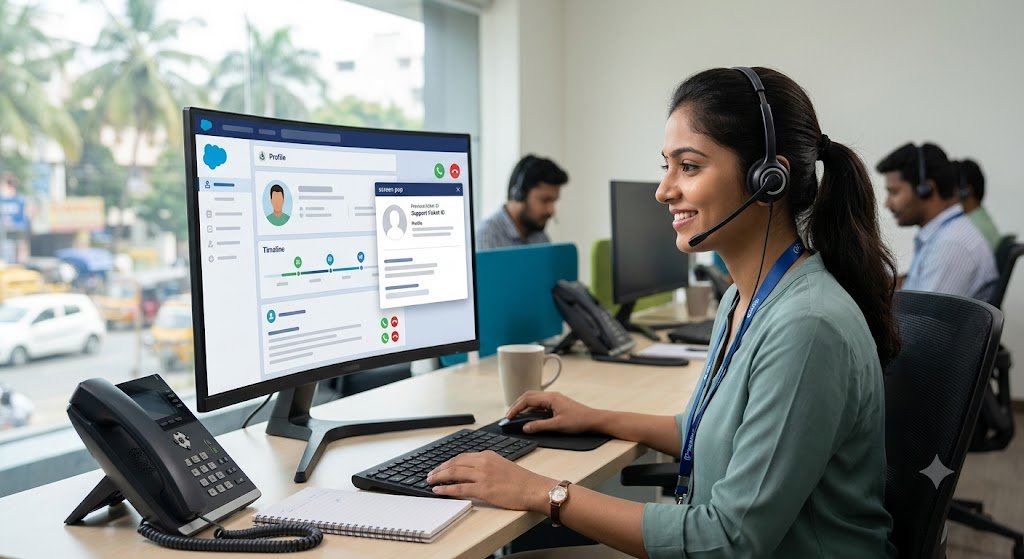
One of the most immediately useful features of this integration is the screen pop — the customer’s Salesforce record appears on the agent’s screen the instant the phone rings, before they’ve even said “hello.” As covered in our piece on how screen pop functionality can transform a sales team by giving agents instant access to caller information the moment a call comes in, eliminating the scramble to look up account details, this same instant-context advantage applies just as powerfully to support teams handling incoming tickets and calls.
Instead of asking “Can you remind me of your account number?”, agents open with “I can see you reported a billing issue last Tuesday — has that been resolved?” That single shift changes the entire tone of the interaction.
Why First Impressions on Support Calls Matter So Much
Customers judge the quality of support within the first fifteen seconds of a call. An agent who already knows the history isn’t just faster — they come across as competent and attentive, which builds trust immediately.
Automatic Call Logging: No More Missing Notes
Manually logging call outcomes after every conversation is tedious, and under pressure, it’s often skipped entirely — which means the next agent who picks up that account has no record of what happened. With automated call logging, calls are logged automatically without agents needing to type entries manually, and the previous approach of doing this by hand was hurting both accuracy and sales performance. For support teams, this means every interaction is captured in Salesforce automatically, creating a reliable history that any agent can pick up seamlessly.
Click-to-Call and Faster Callbacks
Integration also means agents can dial directly from within Salesforce records — no need to switch to a separate dialer or manually key in numbers. This small convenience adds up across hundreds of daily calls, shaving seconds off every outbound interaction and reducing dialing errors.
How This Translates Into Measurable Support Improvements
Faster Resolution Times
When agents aren’t wasting the first two minutes of a call gathering basic information, resolution times drop noticeably. This directly supports the goal explored in our article on boosting customer satisfaction through faster call handling — because speed, when paired with accuracy, is one of the strongest drivers of customer satisfaction scores.
Higher First-Call Resolution Rates
With full account history, past tickets, and purchase details visible instantly, agents are far more likely to solve the issue on the first call rather than needing a follow-up. This is one of the metrics worth tracking closely, and it ties into the broader picture we cover in call center metrics that matter for understanding what genuinely reflects service quality.
A Smarter IVR Experience
Salesforce integration pairs particularly well with a well-configured routing system. When calls are intelligently routed based on account type or issue history before they even reach an agent, support becomes proactive rather than reactive. Our guide on multi-level IVR configuration for IP EPABX systems explains how this routing layer works alongside CRM data to send the right caller to the right specialist immediately.
ACD and IVR Working Together With CRM Data
It’s worth understanding the distinction between automatic call distribution and interactive voice response, since both play a role in this ecosystem. Our breakdown of ACD versus IVR as the backbone of modern call centers is a useful companion read for anyone setting up a support desk that leans on Salesforce data for smarter routing decisions.
Employee Productivity Gains
None of this only benefits customers — agents themselves feel the difference. Reducing repetitive manual work frees them up for the parts of the job that actually require human judgment: empathy, problem-solving, and relationship-building. We explored this shift in detail in our article on increasing employee productivity with modern phone systems, where reduced administrative burden was a recurring theme across businesses that made the switch.
Security and Data Integrity Considerations
Naturally, connecting a CRM to your phone system means sensitive customer data is flowing between platforms, so security can’t be an afterthought. If your support desk handles financial details, healthcare information, or other sensitive data, it’s worth reviewing how secure IP PBX systems with end-to-end encryption serve financial firms, since the same encryption principles apply to any business handling confidential customer records through a CRM-connected phone system.
Call Recording for Quality and Compliance
Beyond security, many support teams also rely on recorded calls for training and dispute resolution. Pairing this with Salesforce means recordings can be automatically attached to the relevant customer record. Our article on IP PBX systems with automatic call recording for customer support centers goes into more depth on how this feature supports both quality assurance and compliance requirements.
Getting Started: What Businesses Should Know Before Integrating
Choosing the Right IP PBX Foundation
Not every phone system integrates cleanly with Salesforce, so the starting point matters. If you’re evaluating options, our comprehensive resource on integrating your IP PBX with your CRM lays out what to look for in terms of compatibility and setup requirements.
Local Support Makes a Real Difference
For businesses in Tamil Nadu specifically, working with a provider who understands local infrastructure and can offer on-the-ground support matters. Our guide on IP PBX systems with CRM specifically for Chennai and Coimbatore businesses covers considerations unique to this region, including support response times and local compliance factors.
A Realistic Rollout Timeline
Most businesses can expect a phased rollout: initial configuration and testing, a pilot with a small team, then a full rollout once workflows are confirmed. Rushing this process tends to create more support tickets than it solves, so patience during setup pays off in smoother adoption.
The Bigger Picture: Support as a Competitive Advantage
Customer support isn’t just a cost center anymore — it’s often the deciding factor in whether a customer stays or leaves. Businesses that invest in this kind of integration aren’t just solving an internal efficiency problem; they’re building a support experience that customers notice and remember. When a caller feels recognized and helped quickly, that impression sticks — and it’s one of the simplest, most durable competitive advantages a business can build.
FAQs
How does Salesforce integration with an IP PBX system actually work?
The phone system connects to Salesforce through an API-based integration, allowing caller ID data to automatically match against customer records, trigger screen pops, and log call details without manual entry.
Will this integration work with our existing phone system, or do we need new hardware?
Many modern IP PBX systems support Salesforce integration through software configuration alone, though older or purely analog systems may need an upgrade first.
How long does it typically take to set up Salesforce integration for a support team?
A basic setup can often be completed within a few days, though full rollout with testing and agent training usually takes a few weeks for larger teams.
Is customer data secure during this integration?
Yes, provided the integration uses encrypted connections and the IP PBX provider follows proper data security protocols, which should always be confirmed before implementation.
Does this integration only help large support teams, or is it useful for small businesses too?
Small support teams often see the biggest relative improvement, since even one or two agents save significant time when manual lookups and data entry are eliminated.