Using CRM Data for Intelligent Call Routing: Turn Every Incoming Call Into a Personalized Experience
Why Your Phone System Is Still Guessing Who’s Calling
Picture this. A loyal customer who has spent lakhs with your company over three years calls your support line. Your IVR greets them with the same generic menu it gives a first-time caller. They punch through three menu layers, get routed to a random agent, and have to re-explain their entire history before anyone can help them.
That frustration isn’t a staffing problem. It’s a data problem. Your phone system and your CRM are operating like two strangers who’ve never met, even though they’re both looking at the exact same customer.
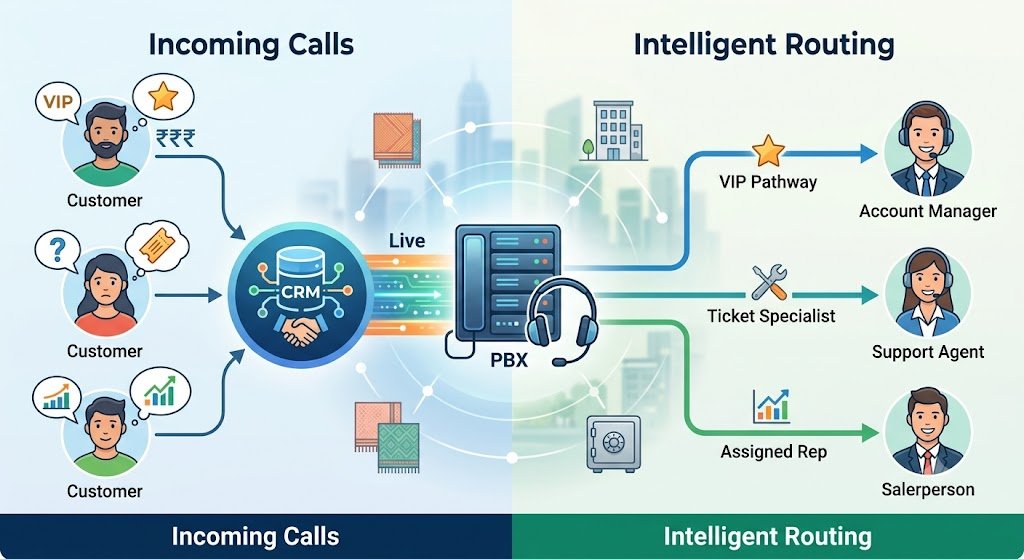
Intelligent call routing powered by CRM data closes that gap. Instead of routing calls based on nothing more than “next available agent” or a static menu tree, your IP PBX pulls live customer information from your CRM the instant a call comes in, and decides where that call should go based on who’s calling, what they need, and who’s best equipped to help them.
What CRM-Driven Call Routing Actually Means
At its core, intelligent call routing is a handshake between your IP PBX system and your CRM, similar to the kind of Salesforce and Zoho integration workflows many Coimbatore and Chennai businesses have already started adopting for screen pop functionality. The moment a call lands, the system checks the caller’s number against CRM records and instantly knows:
- Whether the caller is an existing customer, a lead, or an unknown number
- Their purchase history, deal stage, or open support tickets
- Which sales rep or support agent they last spoke with
- Their assigned account manager, region, or customer tier
- Any flags for VIP status, complaint history, or renewal urgency
That information then drives a routing decision in real time, before the phone even finishes its first ring on the agent’s end.
The Difference Between Basic ACD and CRM-Enriched Routing
Most businesses already use some form of Automatic Call Distribution. If you’ve read our breakdown of ACD vs IVR, you know that a standard ACD queues calls and distributes them based on availability, skill group, or simple round-robin logic. That’s useful, but it’s blind. It doesn’t know that the caller waiting in queue is a customer worth six figures in annual revenue, or that they called twice yesterday about the same unresolved issue.
CRM-enriched routing adds a layer of business intelligence on top of that queue logic. It doesn’t just ask “who’s free?” It asks “who’s free AND best suited to serve this specific person, right now?”
Skill-Based Routing Meets Relationship-Based Routing
Traditional skill-based routing matches a caller to an agent who speaks a certain language or handles a certain product line. CRM data lets you go further with relationship-based routing:
- Returning customers get routed to the agent who handled their last interaction, preserving continuity
- High-value accounts skip the general queue entirely and land with senior support staff
- Callers with an open, unresolved ticket bypass the menu and go straight to a specialist
- Leads in an active sales pipeline route directly to the assigned salesperson instead of a generic sales queue
This is the same principle behind automated call logging reducing manual entry errors — the system already has the context, so why make the human re-discover it every single time?
How the Technical Handshake Works Behind the Scenes
If you’re wondering how a phone call and a database record talk to each other, the mechanics are simpler than most business owners expect.
Caller ID Lookup and CRM Matching
The moment a call reaches your IP PBX, the system performs a reverse lookup on the incoming number against your CRM’s contact database. If your business has already set up IP PBX integration with CRM systems, this lookup happens in milliseconds, well before the call reaches an agent’s headset.
Routing Rules Engine
Once the caller is identified, a rules engine evaluates a set of conditions your team has pre-configured. These conditions can be layered and prioritized, such as:
- Is this contact tagged as “Enterprise” or “Priority”?
- Does this contact have an open case with a specific department?
- Has this contact interacted with a particular agent in the last 30 days?
- Is this contact in a specific sales pipeline stage?
Based on which conditions match, the call is routed to the appropriate queue, extension, or even a specific individual’s direct line.
Fallback Logic for Unmatched Callers
Not every caller will exist in your CRM. First-time callers, spam numbers, or contacts entered under a different phone format need a sensible fallback path. Good CRM-routing setups default unmatched callers into a standard IVR flow or general queue, similar to what’s covered in our guide on multi-level IVR configuration, so nobody gets stuck in a dead end just because they’re not yet in your database.
Real Business Scenarios Where This Pays Off
Textile Exporters Managing International Buyer Calls
Coimbatore’s textile exporters often juggle dozens of international buyers across different time zones and currencies. As we discussed when covering how textile exporters reduce international calling costs, the same IP PBX infrastructure that cuts calling costs can also route a buyer’s call directly to the export coordinator who handles their account, instead of a general reception desk that has to transfer the call twice.
Real Estate Teams Chasing Hot Leads
For real estate businesses using mobile-integrated IP EPABX systems, CRM-based routing means a lead who filled out a property inquiry form last week gets connected straight to the agent who’s already been nurturing that relationship, rather than whoever happens to pick up first.
Financial Firms Handling Sensitive Client Calls
Security-conscious industries benefit enormously here too. Firms that have implemented end-to-end encrypted IP PBX systems can pair that security layer with CRM routing to ensure sensitive client calls always reach an authorized relationship manager, not a random available agent.
The Business Impact Nobody Talks About Enough
Faster Resolution Times
When an agent already sees the caller’s history on screen the moment the call connects, average handling time drops significantly. There’s no fumbling through “can you tell me your account number again?” The conversation starts where the last one left off.
Higher Customer Satisfaction Scores
Customers notice when a business remembers them. This ties directly into the ideas we explored around boosting customer satisfaction with faster call handling — recognition and speed compound each other. A caller who feels recognized is far less likely to escalate frustration, even when the underlying issue takes time to solve.
Increased Sales Conversion
Sales teams see a measurable lift too. When inbound calls from active leads route directly to the rep who owns that relationship, deals move faster and fewer opportunities slip through the cracks during handoffs.
Reduced Agent Burnout
Agents spend less time context-switching and repeating discovery questions. This connects to what we’ve covered on increasing employee productivity with modern phone systems — when the system does the groundwork, humans get to focus on actually solving problems instead of information retrieval.
Common Pitfalls Businesses Run Into
Treating It as a “Set and Forget” Project
CRM-driven routing needs periodic review. Sales territories change, agents leave, product lines shift. Routing rules configured a year ago may no longer reflect your current team structure.
Poor Data Hygiene in the CRM
If your CRM has duplicate contacts, outdated phone numbers, or inconsistent formatting, the matching engine will fail silently, and calls will fall back to generic routing without anyone noticing. A quarterly data cleanup is worth the effort.
Overcomplicating the Rules Engine
It’s tempting to build fifteen layers of conditional logic. In practice, three or four well-chosen priority rules (VIP status, open ticket, existing relationship, sales stage) cover the vast majority of real-world scenarios without turning your routing configuration into an unmanageable maze.
Ignoring Mobile and Remote Extensions
If part of your team works from home or the field, make sure your routing rules also account for remote extensions on IP EPABX, so a smart routing decision doesn’t dead-end at an office desk phone nobody’s sitting at.
Getting Started With CRM-Integrated Routing for Your Business
If you’re running Zoho, Salesforce, or another CRM alongside your IP PBX, the good news is that most of the groundwork may already exist. Our guides on integrating IP PBX with Zoho and how Salesforce integration enhances customer support walk through the technical setup step by step. From there, layering in intelligent routing rules is a configuration exercise, not a rebuild.
A Simple Starting Checklist
- Confirm your CRM and PBX are already synced and sharing contact data reliably
- Identify your top 3–4 routing priorities (VIP accounts, open tickets, active deals, past agent relationships)
- Set up fallback routing for unmatched or new callers
- Test with a small pilot group before rolling out company-wide
- Review and adjust rules every quarter as your team and customer base evolve
Frequently Asked Questions
Does CRM-based call routing work with any IP PBX system?
Most modern IP PBX platforms support CRM integration through APIs, though the depth of functionality varies by brand. Systems like Matrix, Grandstream, and Asttecs generally offer solid integration support, especially when configured by an experienced provider.
Will this slow down how quickly calls are answered?
No. The CRM lookup and rules evaluation happen in the background within milliseconds, before the call even reaches a ringing state on the agent’s end. Callers won’t notice any added delay.
What happens if a caller isn’t in the CRM at all?
The call simply falls back to your standard routing logic, such as a general queue or your existing IVR menu, so no caller is left without a path forward.
Can this work for outbound calls too, not just inbound?
Yes. Many businesses extend the same CRM data to outbound dialing, automatically logging call outcomes and updating contact records without manual entry, similar to the automation benefits covered in our call logging guide.
Is this only useful for large call centers, or does it help small businesses too?
Small businesses often see the fastest impact because the personal touch matters even more when customer relationships are built on fewer, higher-value interactions. Even a small team benefits from not making a loyal customer repeat their story every time they call.
How difficult is it to set up if we already use a CRM?
If your CRM and phone system are already integrated for basic functions like screen pop or call logging, adding routing rules is typically a configuration task rather than a new technical project, and can often be completed within a few days.